There is already software for almost everything a small business does. Invoicing, estimates, scheduling, customer lists, the books, the follow-ups. So when an owner tells me they have a problem, it is almost never because a tool does not exist. It is because the tool that exists was built for someone else, and it never quite fits the way they actually work, or the person who actually has to use it. Closing that gap is the work I do. What follows is one example, built for an auto shop owner, and you can have it walk you through itself out loud.
Every business has a software graveyard
Open the billing page of almost any small business and you will find it: subscriptions to tools nobody opens anymore. The scheduling app they tried for a month. The CRM a consultant set up that everyone quietly abandoned. The accounting platform that does everything except the one thing they needed it to do simply. Money going out every month for software that is technically running and practically dead.
This is not a discipline problem, and it is not a you problem. It is the most normal thing in the world. The owner bought a tool to solve a real pain, the tool was built for a slightly different business than theirs, and the distance between those two things was just big enough that going back to the old way was easier than fighting it.
Why the software you already pay for goes unused
When a tool does not stick, it is usually one of a handful of reasons, and none of them are about the owner being lazy or behind:
- It was built for a bigger or different business. Most popular platforms are designed for the company two or three sizes up from you, with staff to run them. You inherit all that weight and none of the help.
- The one thing you need is buried under ten you do not. Every extra button is a small tax on the person trying to do one simple thing in the truck, between jobs, with grease on their hands.
- It assumes a workflow that is not yours. The software wants you to work its way. Real businesses have their own order of operations, built over years, and they are not going to reorder their whole day to satisfy a menu.
- It does not meet the person where they are. Comfort with technology is real and it varies. A tool that feels obvious to one owner feels like a cockpit to another. The second owner is not the problem. The fit is.
Notice that none of these are fixed by adding features. They are fixed by subtraction, and by shaping the tool around one specific business instead of the average of ten thousand.
The workaround has a price, and you are already paying it
When the software does not fit, the work does not disappear. It moves back onto paper, into texts, into a spreadsheet someone always means to update. That workaround feels free because nobody invoices you for it. It is not free.
For the shop owner this post is about, the quoting and paperwork ran ten to fifteen minutes per customer, at the end of a day that was already full. Across a week that is most of a day, gone. So it got rushed, skipped, or done at 9pm, which meant estimates went out slow, jobs got forgotten, and tax time became a shoebox of receipts and guesswork. The cost was never just the minutes. It was the jobs that slipped, the customers who did not come back because nobody followed up, and the money that was impossible to see clearly because it was never written down.
Existing is not the same as right
The most powerful platform on the market is worthless if the person it is for cannot, or will not, use it. Adoption is the whole game.
This is the part most people miss. They judge software by its feature list, when the only thing that matters is whether the human in front of it actually uses it, every day, without being nagged. A simple tool that gets used beats a powerful one that sits in the graveyard, every single time. And a tool gets used when it is specific enough and simple enough that it disappears into how someone already works.
So the real question is never whether a tool for this exists. It is whether there is a tool that is right for this business and this person. For the shop owner, the honest answer was no. So I built one.
What "built for him" meant
I did not try to talk him into a big platform. I built one thing that does exactly what he does, in the order he does it, on the phone already in his hand. He talks through the job the way he would explain it to the customer, and everything else (the estimate, the invoice, the customer history, the books) builds itself behind him. No features he does not need. No screens he has to study. The first time he picked it up, it clicked. That is the entire difference between software that exists and software that is right for you.
How it works, step by step
Here is the full flow, from talking out a job to books that are ready for tax time. Press play and the same voice that guides him inside the app will narrate each screen, scrolling to each one as it goes. Or just scroll and read.
It plays each step in order and scrolls to the screen it is describing. Tap any step to start there, or pause anytime.
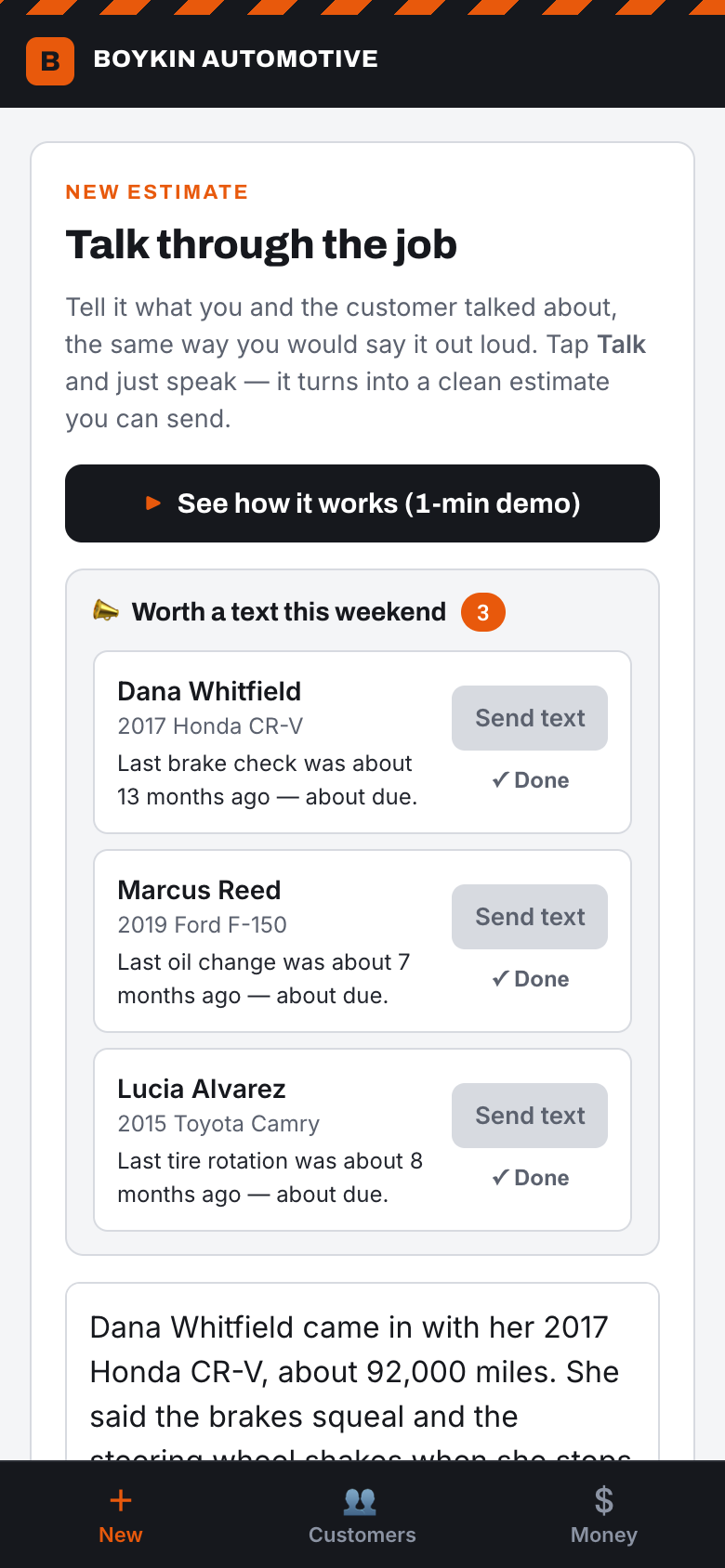
Talk through the job
He taps the box, taps the mic, and just says what he found, the same way he would tell the customer. No writing anything up. The words land in the app as he speaks.
Now playing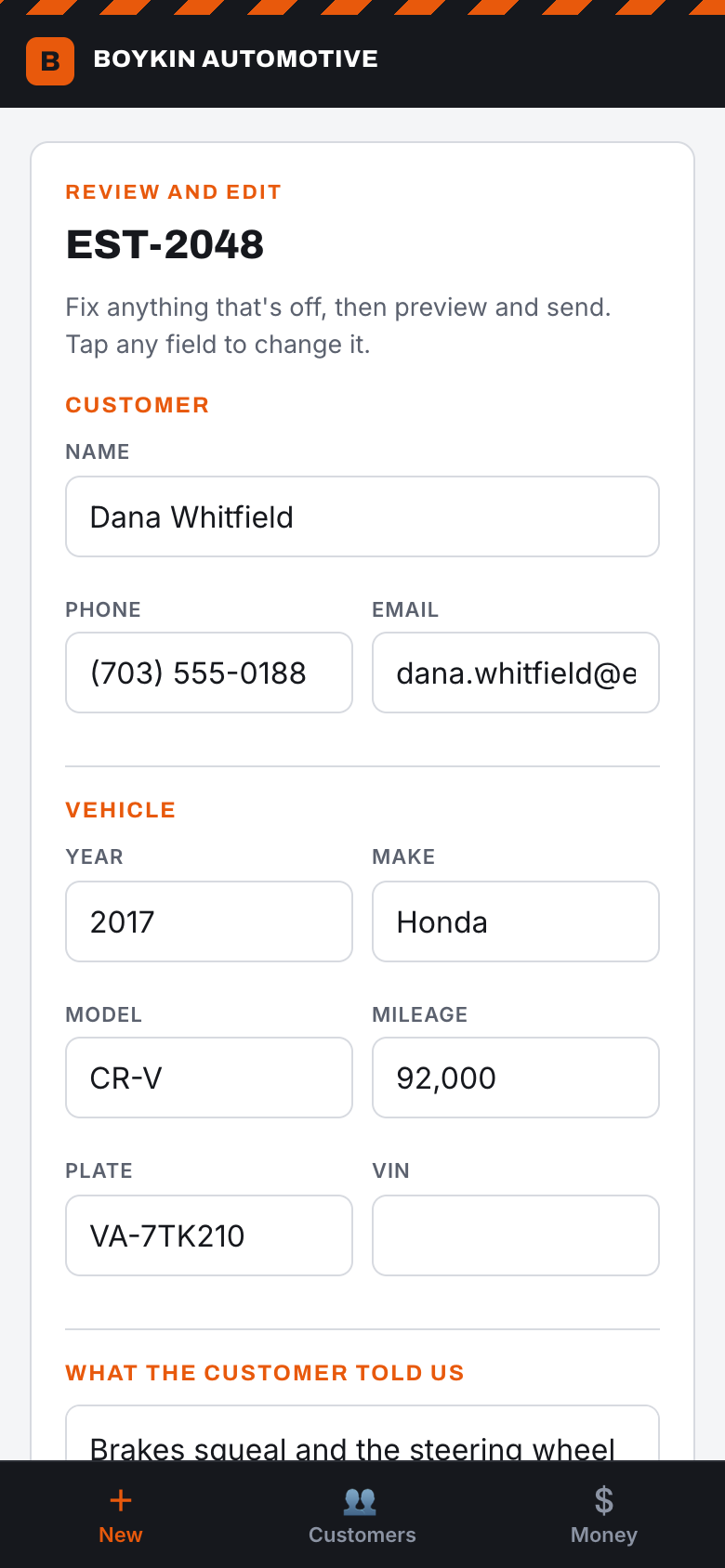
One tap turns it into an estimate
It pulls out the customer, the car, and the work, and prices it in plain language the customer actually understands. No typing, no jargon.
Now playing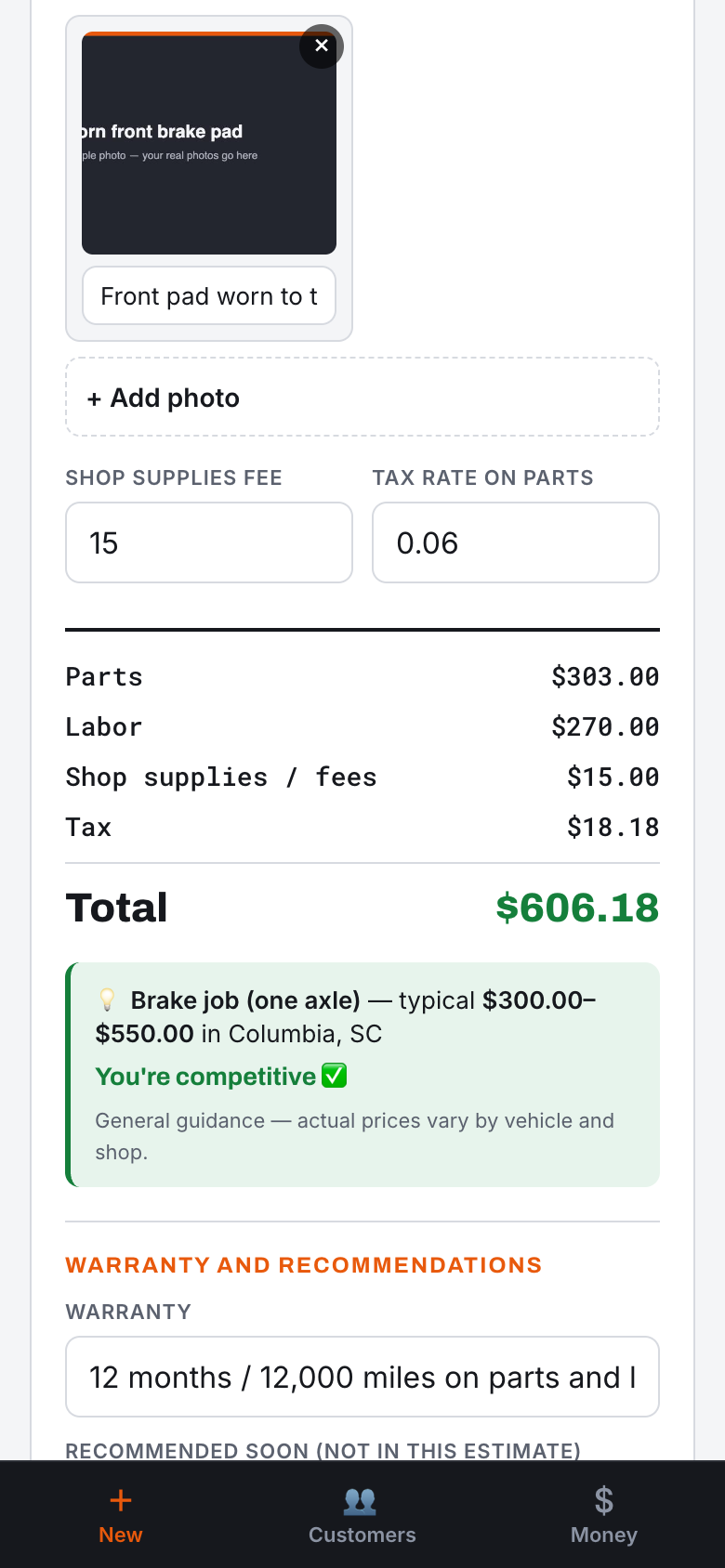
Everything is editable
Parts, labor hours, prices, and the total are all right there. Anything that is not quite right, he taps it and changes it, and the total recomputes on its own.
Now playing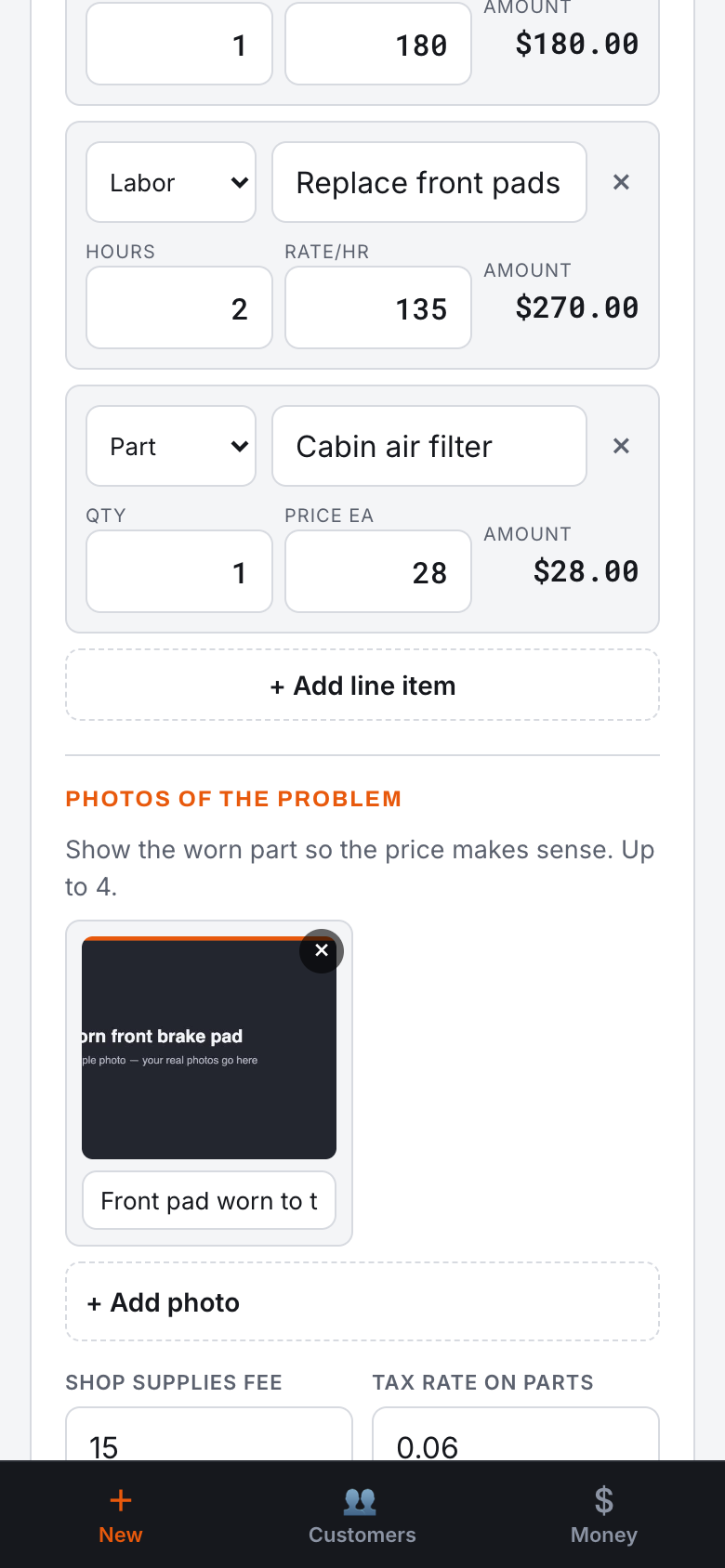
Show the problem
He snaps a photo of the worn part right from his phone, and it goes on the estimate. Now the price is not a surprise. The customer can see exactly why. Fewer arguments, more approvals.
Now playing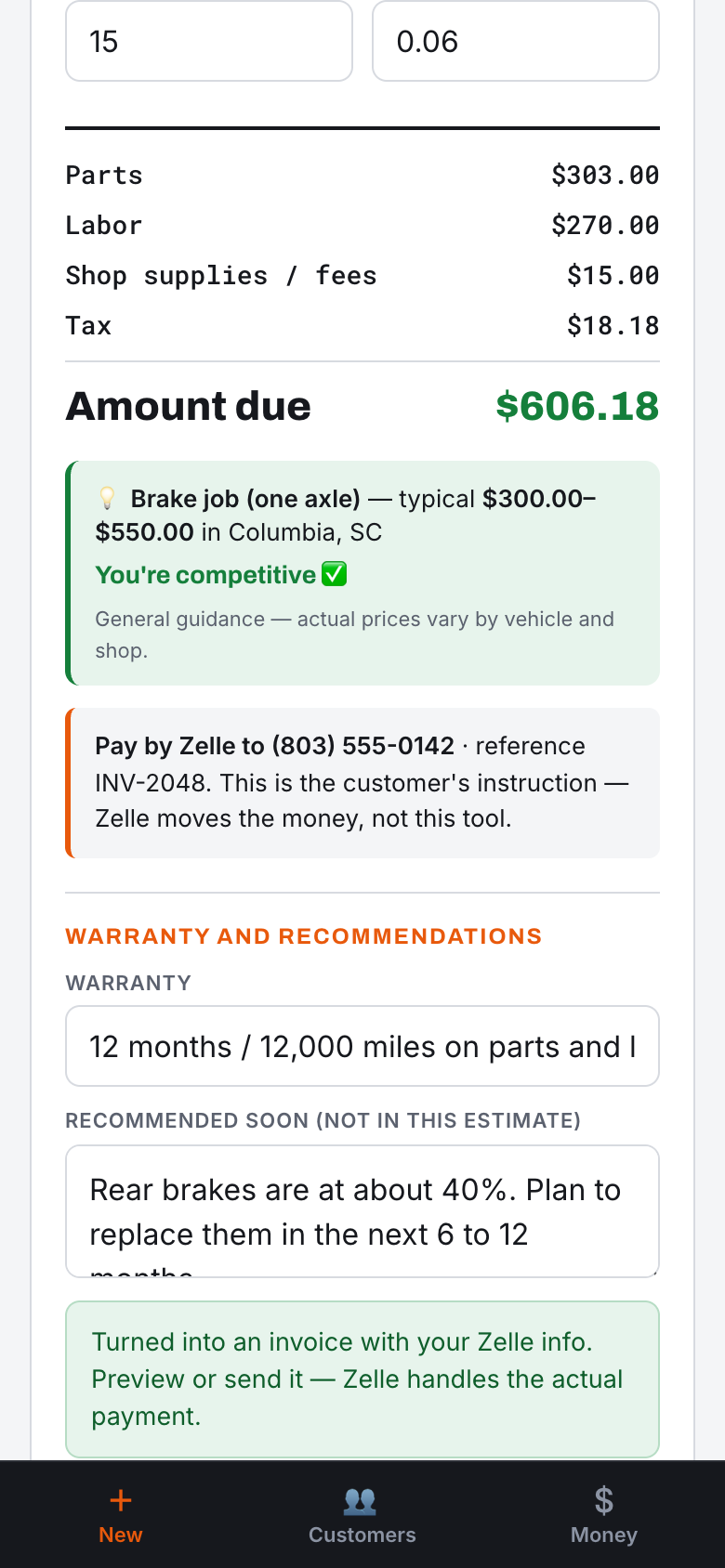
Get paid
When the work is done, the same document becomes an invoice with his Zelle info right on it. He marks it paid and it is recorded. Zelle still moves the money. This just kills the chasing and the tracking.
Now playing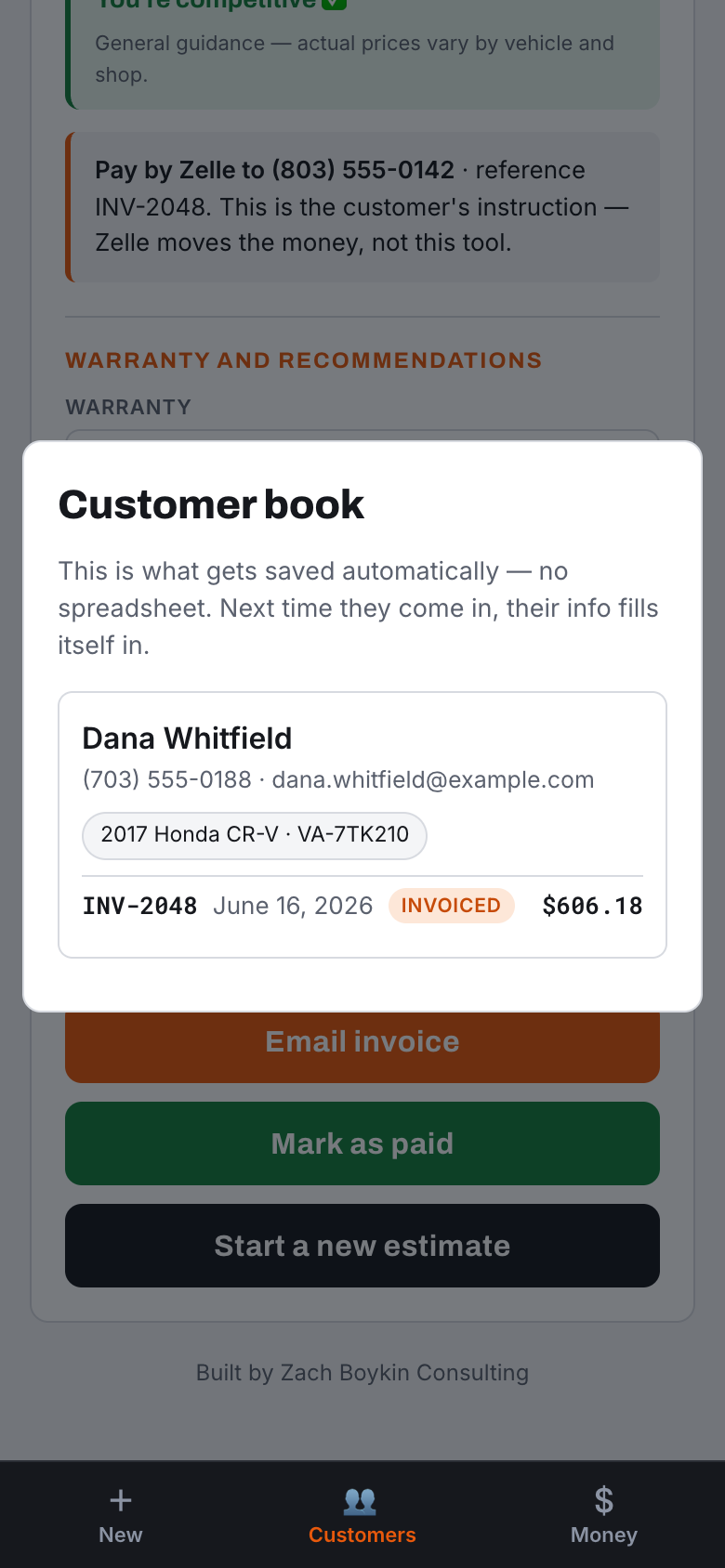
They come back
Every estimate quietly saves the customer and their car. Next time they come in, he searches their name and it all fills in: what car, what he did last time, what he flagged as coming up. The spreadsheet is gone.
Now playing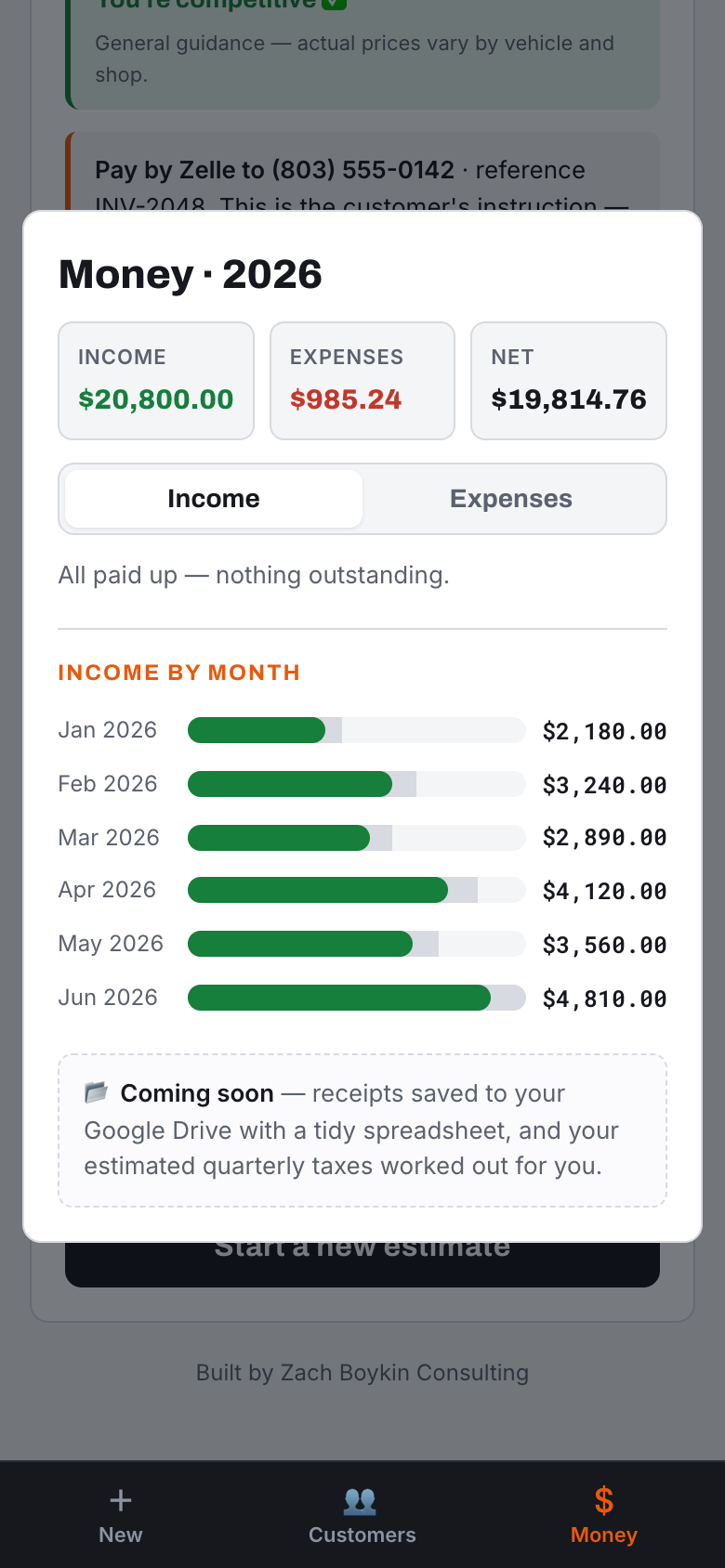
Tax time is already done
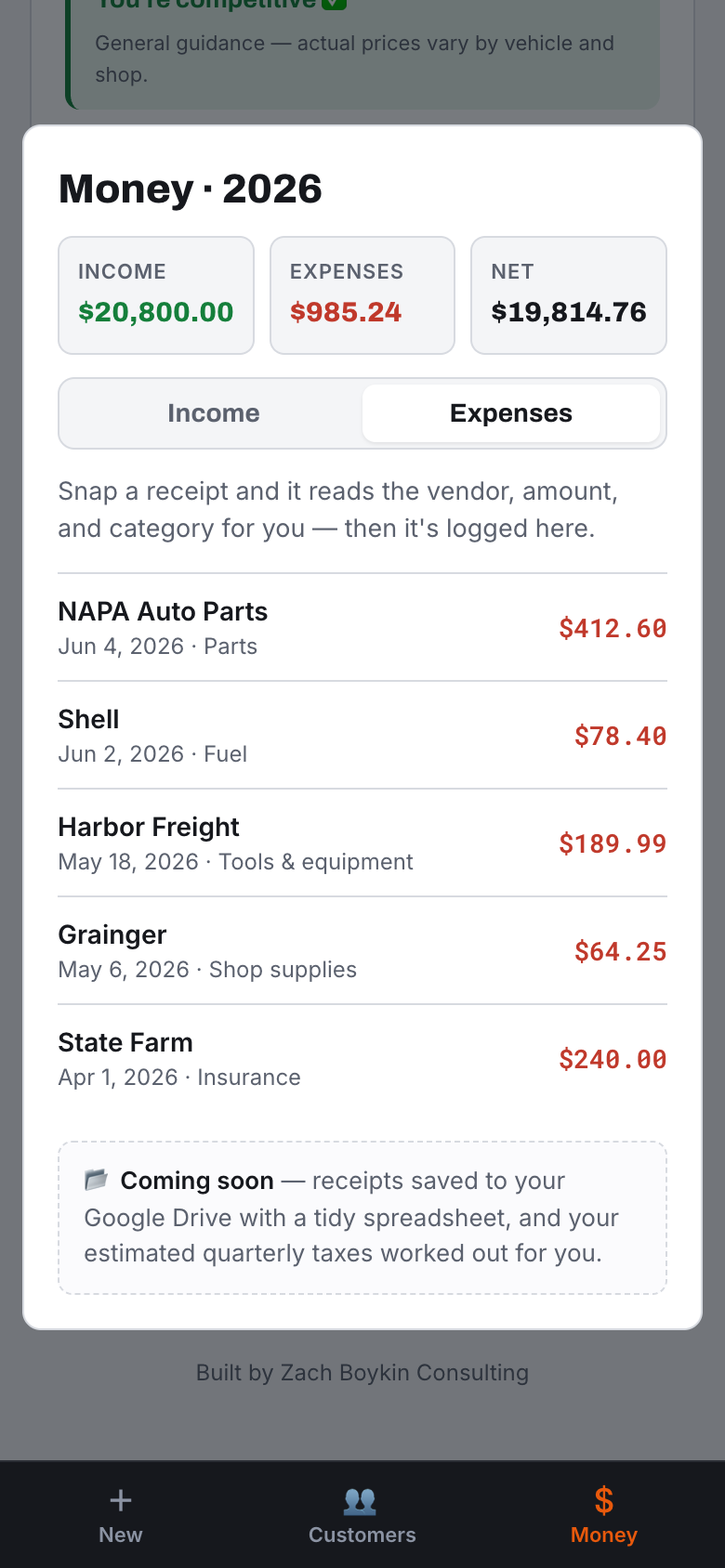
Every paid job and every logged receipt adds up here. Income, expenses, and profit, month by month. He can snap a photo of a receipt and it reads the vendor, amount, and date for him. When taxes come, the books are already sitting there.
Now playingWhat "built for you" actually means
Strip away the auto shop specifics and the same principles hold for any business I build for:
- It does one job, the way you do it. Not a suite. The thing you actually need, shaped to your order of operations, so using it feels like doing the work rather than extra work on top of it.
- It meets the person, not the org chart. Built for the comfort level of whoever actually has to touch it, whether that is you, a tech in the field, or a front desk that turns over twice a year.
- It earns the next step. It starts as the smallest thing that helps, then grows only where you genuinely feel the need. No paying today for features you might use in two years.
- The busywork happens behind the scenes. Records, history, books, follow-ups: they assemble themselves out of the work you were already doing, instead of being a second job you have to remember to do.
When a custom build is worth it, and when it is not
I am not going to pretend custom is always the answer. Plenty of businesses are well served by off-the-shelf tools, and if the platform you have fits how you work and your team actually uses it, keep it. I will tell you that to your face before I ever quote you a build.
Custom earns its keep when one of these is true: you have a workflow that is genuinely yours and no standard tool respects it; you are paying for tools nobody opens and the real cost is the workaround running underneath them; the person who has to use it will not adopt anything that was not built around them; or the busywork is quietly costing you more in lost time and lost jobs than any tool would. When two or more of those are true at once, custom is usually the cheaper option wearing a more expensive price tag.
How I approach a build
I start by watching the work, not the wish list. I want to see the actual day, the actual workaround, and the exact moment the friction shows up, because that is where the tool has to fit. Then I build the smallest version that removes that friction and put it in your hands fast, so we are reacting to something real instead of arguing about a spec sheet. From there it grows only where you feel the need. The goal is never the most impressive software. It is the tool you are still using a year from now without thinking about it.
The takeaway
He talks, it writes the estimate, he sends it, he gets paid, his customer list builds itself, and his books are ready for tax time. All of it happens while he works, not at 9pm. That is the admin gone, and it is gone because he actually uses the thing.
None of this came from a template. It was shaped around one person: how he quotes, how he prices, and exactly how much he is willing to touch on a screen. When the tool fits the business and the person instead of the other way around, it gets used. That is usually where the real value was hiding all along.
Is something in your business like this?
Maybe you are paying for a tool nobody on your team actually opens. Maybe you have a workflow held together by a spreadsheet and a workaround, because no off-the-shelf app quite fits it. That gap, the one between the software that exists and the software that would actually work for you, is what I build. If something in your business feels like that, I would like to hear about it. No pitch, just a conversation.
Email me at zach@zachboykin.comOr reach me directly: zach@zachboykin.com